“at least two or three hours per week”

Randal Schwartz, in his interview with Leo Laporte and Chris DiBona on FLOSS #9 (way before Randal was ever the host of the same show), says around the 9:20 mark that “Perl is meant for people who use the language at least two or three hours per week”.

This remark was highlighted by John D. Cook in Three-hour-a-week language. I found an even better thought in the comments. rdm says it’s more about knowing what to look for:

I have enough of a perl vocabulary that I know how to perform relevant searches when I am reaching for a concept. Python? Not so much…

That doesn’t have much to do with the language, really. If you spend a couple of hours each week using a language, reading the docs, and looking for answers, you gain experience and knowledge about the process making it slightly easier the next time. I’m not a great programmer, but I’m a pretty good answer finder. That can make up for a lack of talent.

In my Learning Perl classes, I tell people they aren’t going to learn Perl in a week. I can make them aware of things, but they need to practice. Even though we do exercises in the class, thinking about Perl all day for four days can melt anyone’s brain. Take that three (or more) hours a week for half a year and you’ll probably get passably good.

I got used to Perl by doing it almost every day all day for two years, but then I had to relearn it when Randal trained me to be a Perl trainer. I actually learned more by answering the random questions that people had. That was either students in classes or conversations on usenet. Now that could be Stackoverflow. You create some common set of problems for yourself, but by reading the problems from many people, you get to learn things from problems you wouldn’t make yourself. That’s where the gold is.

“The stat preceding -l _ wasn’t an lstat”

I ran into a fatal error that I haven’t previously encountered and I couldn’t find a good explanation where I expected it. The -l file test operator can only use the virtual _ filehandle if the preceding lookup was an lstat.

The file test operators, all documented under the -X entry in perlfunc, can use the virtual filehandle _, the single underscore, to reuse the results of the previous file lookup. They don’t just look up the single attribute you test, but all of it (through stat) which it filters to give you the answer to the question that you ask. The _ reuses that information to answer the next question instead of looking it up again.

I had a program that was similar to this one, where I used some filetest operators, including the -l to test if it’s a symbolic link.

use v5.14;

my $filename = join ".", $0, $$, time, 'txt';
my $symname  = $filename =~ s/\.txt/-link.txt/r;

open my $fh, '>', $filename
	or die "Could not open [$filename]: $!";
say $fh 'Just another Perl hacker,';
close $fh;

symlink $filename, $symname 
	or die "Could not symlink [$symname]";

# http://perldoc.perl.org/functions/-X.html
foreach( $filename, $symname ) {
	say;
	say "\texists"           if -e;
	say "\thas size " . -s _ if -z _;
	say "\tis a link"        if -l _;
	}

I get this fatal error:

The stat preceding -l _ wasn't an lstat at test_link_test.pl line 19

The entry in perlfunc doesn’t say anything about this, but it hints that -l is a bit special:

If any of the file tests (or either the stat or lstat operator) is given the special filehandle consisting of a solitary underline, then the stat structure of the previous file test (or stat operator) is used, saving a system call. (This doesn’t work with -t , and you need to remember that lstat() and -l leave values in the stat structure for the symbolic link, not the real file.) (Also, if the stat buffer was filled by an lstat call, -T and -B will reset it with the results of stat _ ).

Adding the diagnostics pragma has the answer that isn’t in perlfunc:

The stat preceding -l _ wasn't an lstat at test_link_test.pl line 19 (#1)
    (F) It makes no sense to test the current stat buffer for symbolic
    linkhood if the last stat that wrote to the stat buffer already went
    past the symlink to get to the real file.  Use an actual filename
    instead.

The other file test operators will perform a stat. If the file is a symlink, the stat follows the symlink to get the information from its target. A symlink to a symlink will even keep going until it ultimately gets to a non symlink. With a stat, the -l _ will never be true because it always ends up at the target, even if it doesn’t exist.

The lstat doesn’t follow the link, so it can answer the -l _ question because it might have returned the information for a link and in the case of a non-link, it works just like stat.

As the long version of the warning says, it’s probably better to never use the _ filehandle and use the full filename instead. Sure, it has to redo the work, but you won’t be surprised by a fatal error if you did the wrong type of lookup before.

Learning Perl Challenge: Remove intermediate directories

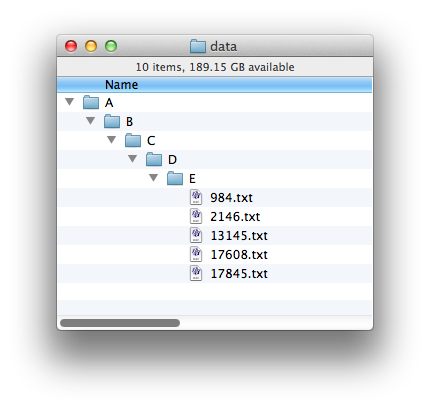
I often run into situations where I have directories that contain only one file, a subdirectory, with contain only one file, a subdirectory, and so on for a long chain, until I get to the interesting files. These situations come up when I have only part of a data set so the files that would be in other directories aren’t there, and I find it annoying to deal with these long directory specifications. So, this challenge is to fix that by collapsing those one-entry directories into a single one.

For example, you should take this structure, where you have A/B/C/D/E in a direct line with no other branches:

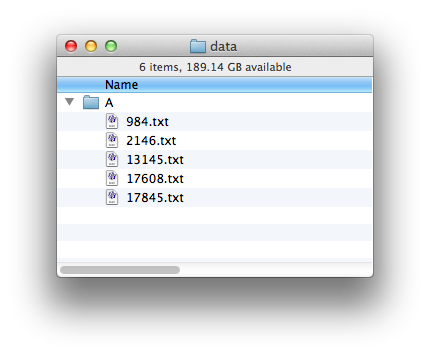
and turn it into this one, with a single directory with the files that were at the end:

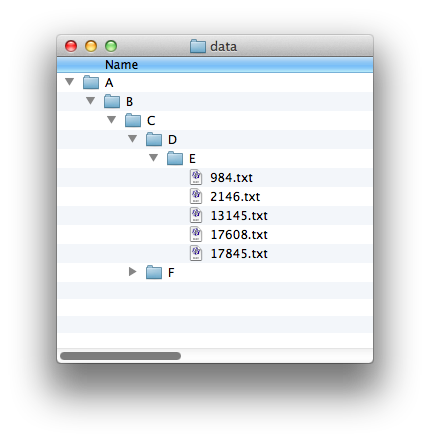
However, you should only moves files up if the directory above it has only one entry (which must be a subdirectory!). In this example, A/B/C has two subdirectories in it:

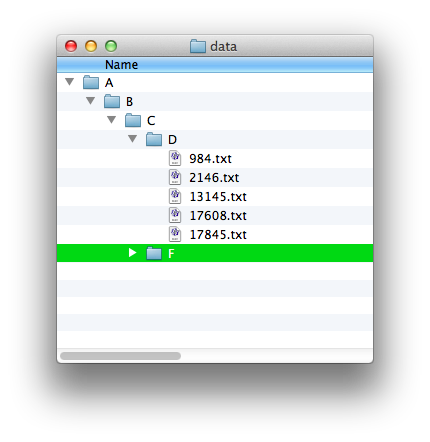
so the the files in E should only move up into D. Otherwise, the files from the two branches in C would get mixed up with each other.

Why Perl’s conditional operator is right associative

What happens if you change the associativity of the conditional operator? PHP implemented it incorrectly and now it’s part of the language. In What does this PHP print?, Ovid posted a bit of PHP code that gives him unexpected results. The code comes from a much longer rant by Alex Munroe titled PHP: a fractal of bad design:


The result is 'horse', and it will be for almost all values of $arg.

% php test.php
horse

I don’t care so much about the rant, but it told me the answer to this problem. The conditional operator is left associative in PHP, as documented in Operator Precedence. That almost made sense to me, and I know that putting parentheses around these things makes it more clear. I’m almost embarrassed to say that I couldn’t do it right off in this case. Where do I put them? With other operators it’s easy because the operator characters are next to each other. I started writing this to figure out the grouping when the operator characters are separated by other things.

Let’s simplify that a bit to we don’t have a big mess. Now there are only two:


The result is still 'horse' because we haven’t really changed anything:

% php simple.php
horse

Joel Berger gave a hint when he said that changing 'car' to '' yields 'feet':


And it does yield 'feet'::

% php null.php
feet

In Perl, the language I do know, the same operator is right associative (Why is the conditional operator right associative? on Stackoverflow explains why). Associativity, documented in perlop, comes into play when the compiler has to figure out which operator to do first when it has the same operator next to each other. In Learning Perl, we show this with the expontentiation operator since many other operators, such as multiplication and addition, don’t really care. The expontentiation is right associative because that’s what Larry decided it was (C doesn’t have this operator). That means it does the operation on the right before it does the operation on the left. You can see this when you use parentheses, the highest precedence operator, to denote the order you want and compare it to the version without the explicit grouping:

my $num = 4**3**2;    # 262144
my $num = 4**(3**2);  # 262144
my $num = (4**3)**2;  # 4096

We can do the same for the conditional operator in Perl. First, we translate the code to PHP, which is mostly changing == to eq:

# perl.pl
use v5.10;

my $arg = 'C';
my $vehicle = (
               ( $arg eq 'C' ) ? 'car' :
               ( $arg eq 'H' ) ? 'horse' : 'feet'
             );
say $vehicle;

This only outputs “car”:

% perl.pl
car

In Perl, we get the same behavior if we put parentheses around the second conditional:

# right.pl
use v5.10;

my $arg = 'C';
my $vehicle = (
               ( $arg eq 'C' ) ? 'car' :
               ( ( $arg eq 'H' ) ? 'horse' : 'feet' )
             );
say $vehicle;

We get the same result as perl.pl because we haven’t changed the order of anything:

% perl right.pl
car

To get the PHP behaviour, we have to change the parentheses like this, to surround everything up to the next ?. It took quite a mental leap for me to get this far because it’s so unnatural:

# left.pl
use v5.10;

my $arg = 'C';                                                        
my $vehicle = (
               ( ( $arg eq 'C' ) ? 'car' : ( $arg eq 'H' ) ) 
               	? 'horse' : 'feet'
             );
say $vehicle;

Now we get different behaviour:

% perl left.pl
horse

That’s really odd, but it’s also a small gotcha we mention in the Learning Perl class. You can have things such as ( $arg == 'H' ) as a branch. This use probably isn’t useful, but it’s a consequence of the syntax. We can do assignments, for instance:

my $result = $value ? ( $n = 5 ) : ( $m = 6 );

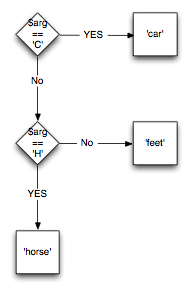
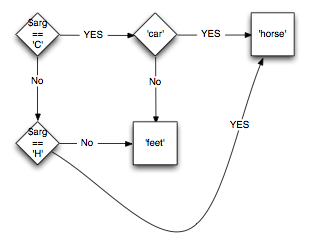
It’s easier to see this as a picture for the path through the conditionals. The right associative version branches either to an endpoint or another decision and there’s only one way to get to that endpoint.

Right associative, as in Perl

The left associative version has multiple ways to get to the same endpoint because either branch in the previous conditional can be the value for the next test. This also shows how 'car' isn’t the endpoint that you think it should be:

Left associative, as in PHP

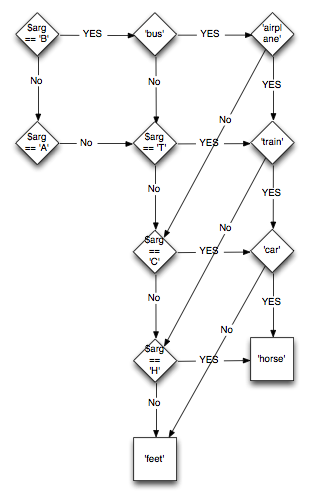
Going back to do the same thing with the original chain of conditionals, we get this diagram that looks more like a corset lacing instruction than something we meant to program.

The full monty

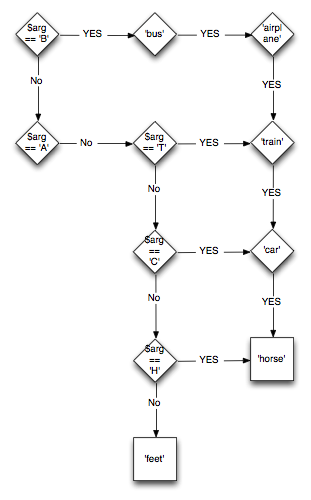
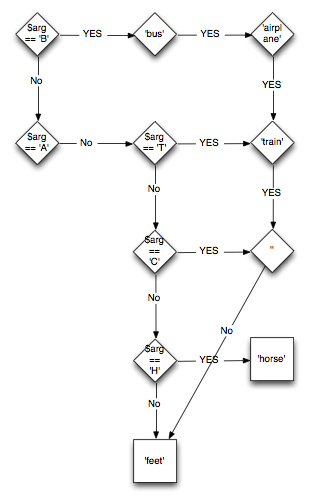
However, we already know the answers in this particular case because some values are literals, so we can remove several paths. Now it’s much more clear that many paths are feeding into a path that must end up at 'horse'.

The full monty

In fact, the only way to get to 'feet' is to be any letter that is not B, A, T, C, or H. Joel figured this out by changing 'car' to the empty string, which has this diagram:

Joel’s change

The only way to get to 'horse' is to be exactly H. The other letters must end up at 'feet' because they all end up at the empty string. Every other string ends up at 'feet' because they are not exactly H.

Maybe the complicated stuff makes sense to PHP programmers. I don’t know. It’s more likely that they don’t do these sorts of things, at least if they’ve read the advice in the PHP manual. Some people blame Perl since PHP inherited from Perl, but it seems like a yacc error that they can’t fix for backward compatibility. It’s not like that’s never happened to Perl

Learning Perl Challenge: popular history (Answer)

June’s challenge counted the most popular commands from a shell history. Some shells remember the last commands you used so you can start a new session and still have them available. For this exercise, I’ll assume the bash shell.

You setup the history feature by telling your shell to track the history. You want to remember 3,000 previous commands:

HISTFILE=/Users/brian/.bash_history
HISTFILESIZE=3000
HISTSIZE=1500

There’s much you can do with your command history, but that’s not what I’m covering here. The bash history cheat sheet explains most of it.

There are two ways you can get at the history. You can run the history command and pipe it to your Perl program as standard input, or you can read the history file (perhaps also piping it at standard input). The shell only writes to the file at the end of the session, so the file doesn’t know about recent commands. Also, each session merely appends to the file. Each session’s history is contiguous, so the file is not necessarily chronological. This doesn’t matter much to the challenge to find the overall popular commands.

Once you get the input, you have to figure out which part is the command. There are several issues there too. The first part of the line might be the command, a path to the command, or some sort of modifier for the command. A command line might have a pipeline of multiple commands or a series of separate commands. Some of the commands might be shell built-ins while others are external programs. Some commands might be user-defined aliases:

tail -f /var/log/system.log
/usr/bin/tail/ -f /var/log/system.log
sudo vi /etc/groups
history | perl -pe 's/\A\s*\d+\s*//'
grep ^_x /etc/passwd | cut -d : -f 1,5 | perl -C -Mutf8 -pe 's/:/ → /g'
(cd /git/dumbbench; git pull origin master)
perldoc -l SQL::Parser | xargs bbedit
export HISTFILESIZE=3000
l

This breaks the challenge into three parts, the last of which is basic accumulator stuff that we show Learning Perl for many tasks.

  1. Get the history
  2. Extract the commands
  3. Count and report the results

I’ll cover each of those parts separately as I go through the answers.

Get the history

Most people opened a filehandle on the history file. Some people hard-coded the path while others made it relative to the home directory:

open( FILE, "/Users/me/.bash_history" );     # rm

my $hist_file = "$ENV{HOME}/.bash_history";  # jose
open my $hf, "<", $hist_file;

my $path    = $ENV{HOME};                    # Dave M
my $history = $path . '/' . '.bash_history';
open( my $f, '<', $history );

open HISTORY, $ENV{'HOME'}.'/.bash_history'  # ulric
  or die "Cannot open .bash_history: $!";

Daniel Keane was the only person to use zsh, which has a history format with timestamps (one of the issues I noted with the bash history):

my $history_path = "$ENV{'HOME'}/.zhistory";
die "Cannot locate file: $history_path" unless -e $history_path;
open(my $history_fh, '<', $history_path);

Neil Bowers used File::Slurp to get it all at once:

read_file($ENV{'HOME'}.'/.bash_history', chomp => 1);

Anonymous Coward set a default value for the history file but also allows people to override it with a command-line option:

my $histfile = "$ENV{HOME}/.bash_history";
my $position = 0;
my $number = 10;
GetOptions (
  'histfile=s' => \$histfile,
  'position=i' => \$position,
  'number=i'   => \$number,
);

A couple of people shelled out to run the history command. WK used history -r to add the history from the history file to the current history, then read the history from the command line:

  my @history = qx/$ENV{ SHELL } -i -c "history -r; history"/; # WX

Javier's answer did much of the work in the shell and awk:

    my $get_cmds =
        qq/$ENV{'SHELL'} -i -c "history -r; history"/
        . q/ | awk '{for (i=2; i>NF; i++) printf $i " "; print $NF}'/;

    chomp(my @cmds = qx# $get_cmds #);

The two winners for getting the data, however, are the two people who provided one-liners. They used standard input, which means they could handle either a file in @ARGV or a pipe from history:

VINIAN might get a "Useless use of cat Award", something Perl's Randal Schwartz used to hand out. The -a switch (see perlrun splits on whitespace and puts the list in @F:

% cat ~/.bash_history | perl  -lane 'if ($F[0] eq "sudo"){$hash{$F[1]}++ } else { $hash{$F[0]}++ }; $count ++; END { @top = map {  [ $_, $hash{$_} ] } sort { $hash{$b}  <=> $hash{$a} } keys %hash; @max=@top[0..9]; printf("%10s%10d%10.2f%%\n", $_->[0], $_->[1], $_->[1]/$count*100) for @max}'

But, VINIAN's program would work with a file argument, As Chris Fedde uses:

% perl -lanE '$sum{$F[0]}++; END{ say "$_ $sum{$_}" for (reverse sort {$sum{$a}  <=> $sum{$b}} keys %sum)}' ~/.bash_history | less

I would think that a better answer to this part would examine the environment variable for HISTFILE, but jose notes that it doesn't work on cygwin. I did not investigate that.

Extract the commands

Extracting the commands is the tough part of the problem, but many people skipped most of that problem. They assumed the first group of non-whitespace was the command, possibly turning an absolute path to its basename.

jose used basename is the command started with a /:

$cmd = basename $cmd if $cmd and $cmd =~ /\//;

You don't really need to check that though. You could just take the basename though, as Dave M did unconditionally:

my $basename = basename( $args[0] );

This ignores something that would be harder to solve; what if two different commands have the same name? For instance, the system perl and a user-installed one might have the same name. Either might be specified as just perl depending on the PATH, and the user-installed one might be a relative path. Most people counted the basename only.

Some people took the commands and checked that they were in the PATH:

    for my $p (@paths) {
        if ( -e "$p/$basename" ) {
            $words{$basename}++;
        }
    }

No one checked for symbolic links.

WK is the only person who translated aliases:

my %alias = get_aliases_hash();

sub get_aliases_hash {
  my @alias = qx/$ENV{'SHELL'} -i -c "alias"/;
  return map { m/\Aalias\s+(.+)='(.+)'\s*$/; $1 => $2 } @alias;
}

ulric and WK are the only people who didn't count sudo by skipping it. Here's how ulric did it:

  if ($commandline[0] =~ 'sudo') {
    shift @commandline;
  } # sudo is ignored as a metacommand

I think most people get fair marks for this part, but if I had to choose a winner, I'd go with WK.

Count and report the results

Once you have the commands, most people used the command as a hash key and adding one to the value. There's not too much interesting there.

My Answer

My answer differs substantially only in the way that I examine the command line. I know about the Text::ParseWords module that can break up a line like the shell would. This is, it can break up a line while preserving quoting. I want to handle the shell special separators ; and | except when they are parts of quoted strings. The parse_lines can handle that:

;
my $delims = '(?:\s+|\||;)';
parse_line( $delims, 'delimiters', $_ );

The first argument is the regular expression I use to recognize a delimiter outside of a quoted string. I can't rely on whitespace (although at first I tried), but the shell can handle things such as tail -f file|perl -pe '...' where the separator has no whitespace around it.

The second argument, if it is the special value delimiters, returns the delimiter string. I need to use this to recognize the start of new commands on the same line.

My program is long and not very fun, since I limit myself to the material in Learning Perl. Fun things such as splice only show up as "things we didn't cover". It's in the Learning Perl Challenges GitHub repository with my other answers.

As well as keeping track of the commands, I track which ones were modified by other commands that I specify in %modifiers. I didn't handle aliases or basenames like many other people did:

#!perl
use v5.10;
use strict;
use warnings;

use Text::ParseWords;

my %commands;
my %modifieds;

my $N = 10;

my %modifiers = map { $_, 1 } qw( sudo xargs );
my $delims = '(?:\s+|\||;)';

while( <> ) {
	my @shellwords    = 
		grep { defined && /\S/ }
		parse_line( $delims, 'delimiters', $_ );
	next unless @shellwords;

	my @start_indices = get_starts( @shellwords );

	# go through the shellwords to find the delimiters like ; and |
	# one command line can have multiple commands, so find all of 
	# them.
	I: foreach my $i ( 0 .. $#start_indices ) {
		my( $start, $end ) = ( 
			$start_indices[$i], 
			$i < $#start_indices ? $start_indices[$i+1] - 1 : $#shellwords
			);
		
		# look through a command group to find the the command
		my $modified = 0;
		J: foreach my $j ( $start .. $end ) {
			next if $shellwords[$j] =~ m/\A$delims\Z/;
			if( exists $modifiers{$shellwords[$j]} ) {
				$modified = $shellwords[$j];
				next;
				}
			if( $modified ) {
				$modifieds{"$modified $shellwords[$j]"}++;
				}
			$commands{$shellwords[$j]}++;
			last J;
			}
		}	
	}

say "------ Top commands";
report_top_ten( $N, %commands );

say "------ Top modified commands";
report_top_ten( $N, %modifieds );


sub get_starts {
	my @starts = 0;
	while ( my( $i, $value ) = each @_ ) {
		push @starts, $i if $value =~ /\A$delims\z/;
		}
	return @starts;
	}

sub report_top_ten {
	my( $top_count, %hash ) = @_;
	
	my @top_commands  = sort { $hash{$b} <=> $hash{$a} } keys %hash;
	my $max_width = length $hash{$top_commands[0]};
	while( my( $i, $value ) = each @top_commands ) {
		last if $i >= $top_count;
		printf '%*d %s' . "\n", $max_width, $hash{$top_commands[$i]}, $top_commands[$i];
		}
	}

And, with that, I find my top commands by reading from standard input and using my environment variable to locat the file:

$ perl history.pl $HISTFILE
------ Top commands
843 make
518 perl
364 ls
343 git
244 cd
156 bb
117 open
 68 pwd
 51 rm
 42 ssh
------ Top modified commands
3 xargs rm
2 xargs bbedit
2 xargs bb
1 xargs stripper
1 sudo cp

The bb is an alias for bbedit, the command-line program to do various things with that GUI editor. The stripper is a program I use to remove end-of-line whitespace. I most often use it with find, which is why it shows up after xargs.

That make comes mostly as make test, and the perl as perl Makefile.PL.